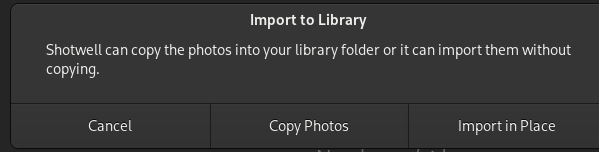
I use a Google Pixel 6a phone, running GrapheneOS (open source secure fork of Android). Everything works exactly like any android phone, I can connect phone to laptop and view files in Files app etc.
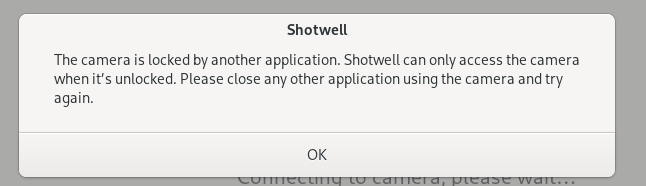
But Shotwell reports something is preventing access so it can’t import photos.
Any ideas appreciated. Screenshot of error below:
Which desktop environment are you in? If in GNOME, check if Files has mounted the phone and if so, click on the “eject” symbol next to it.
Also while this error still persists, can you please post the output of gio mount --list - Shotwell should be able to do that itself, but it seems it does not recognize what is mounted
Sorry I didn’t see the reply.
Yes I am using Gnome DE.
Yes Files did have the phone mounted. I ejected it and it didn’t help, Shotwell then just comes up with “not responding” offering me the Force Quit options. tried several times.
PS I suppose worst case I can just connect phone, grab pics from a folder in Files (on phone) and drag and drop them into Shotwell or import via a temp folder or similar. Would be nice if this feature could be got working though
Ooooh, I’ve had problems with Flatpaks before! Did’t even think, yes I installed it in a rush, chose Flathub Flatpak. I can happily uninstall that and go for Fedora RPM, that may run better. Shall I give that a go?
Thanks so much for your help
I did that.
I found the log file, can’t open (says no access) yet it did open it, I copied and pasted below the contents:
L 2 2024-07-02 13:17:47 [MSG] main.vala:559: Shotwell Photo Manager 0.32.7 (0.32.7)
L 2 2024-07-02 13:17:47 [DBG] main.vala:566: Shotwell is running in timezone BST
\00\00\00\00\00\00\00\00\00\00\00\00\00\00\00\00\00\00\00\00\00\00\00\00\00\00\00\00\00\00\00\00\00\00\00\00\00\00\00\00\00\00\00\00\00\00\00\00\00\00\00\00\00\00\00\00\00\00\00\00\00\00\00\00\00\00\00\00\00\00\00\00\00\00\00\00\00\00\00\00\00
\00\00\00\00\00\00\00\00\00\00\00\00\00\00\00\00\00\00\00\00\00\00\00\00\00\00\00\00\00\00\00\00\00\00\00\00\00\00\00\00\00\00\00\00\00\00\00\00\00\00\00\00\00\00\00\00\00\00\00\00\00\00\00\00\00\00\00\00\00\00\00\00\00\00\00\00\00\00\00\00
\00\00\00\00\00\00\00\00\00\00\00\00\00\00\00\00\00\00\00\00\00\00\00\00\00\00\00\00\00\00\00\00\00\00\00\00\00\00\00\00\00\00\00\00\00\00\00\00\00\00\00\00\00\00\00\00\00\00\00\00\00\00\00\00\00\00\00\00\00\00\00\00\00\00\00\00\00\00\00\00
\00\00\00\00\00\00\00\00\00\00\00\00\00\00\00\00\00\00\00\00\00\00\00\00\00\00\00\00\00\00\00\00\00\00\00\00\00\00\00\00\00\00\00\00\00\00\00\00\00\00\00\00\00\00\00\00\00\00\00\00\00\00\00\00\00\00\00\00\00\00\00\00\00\00\00\00\00\00\00\00
\00\00\00\00\00\00\00\00\00\00\00\00\00\00\00\00\00\00\00\00\00\00\00\00\00\00\00\00\00\00\00\00\00\00\00\00\00\00\00\00\00\00\00\00\00\00\00\00\00\00\00\00\00\00\00\00\00\00\00\00\00\00\00\00\00\00\00\00\00\00\00\00\00\00\00\00\00\00\00\00
\00\00\00\00\00\00\00\00\00\00\00\00\00\00\00\00\00\00\00\00\00\00\00\00\00\00\00\00\00\00\00\00\00\00\00\00\00\00\00\00\00\00\00\00\00\00\00\00\00\00\00\00\00\00\00\00\00\00\00\00\00\00\00\00\00\00\00\00\00\00\00\00\00\00\00\00\00\00\00\00
\00\00\00\00\00\00\00\00\00\00\00\00\00\00\00\00\00\00\00\00\00\00\00\00\00\00\00\00\00\00\00\00\00\00\00\00\00\00\00\00\00\00\00\00\00\00\00\00\00\00\00\00\00\00\00\00\00\00\00\00\00\00\00\00\00\00\00\00\00\00\00\00\00\00\00\00\00\00\00\00
\00\00\00\00\00\00\00\00\00\00\00\00\00\00\00\00\00\00\00\00\00\00\00\00\00\00\00\00\00\00\00\00\00\00\00\00\00\00\00\00\00\00\00\00\00\00\00\00\00\00\00\00\00\00\00\00\00\00\00\00\00\00\00\00\00\00\00\00\00\00\00\00\00\00\00\00\00\00\00\00
\00\00\00\00\00\00\00\00\00\00\00\00\00\00\00\00\00\00\00\00\00\00\00\00\00\00\00\00\00\00\00\00\00\00\00\00\00\00\00\00\00\00\00\00\00\00\00\00\00\00\00\00\00\00\00\00\00\00\00\00\00\00\00\00\00\00\00\00\00\00\00\00\00\00\00\00\00\00\00\00
\00\00\00\00\00\00\00\00\00\00\00\00\00\00\00\00\00\00\00\00\00\00\00\00\00\00\00\00\00\00\00\00\00\00\00\00\00\00\00\00\00\00\00\00\00\00\00\00\00\00\00\00\00\00\00\00\00\00\00\00\00\00\00\00\00\00\00\00\00\00\00\00\00\00\00\00\00\00\00\00
\00\00\00\00\00\00\00\00\00\00\00\00\00\00\00\00\00\00\00\00\00\00\00\00\00\00\00\00\00\00\00\00\00\00\00\00\00\00\00\00\00\00\00\00\00\00\00\00\00\00\00\00\00\00\00\00\00\00\00\00\00\00\00\00\00\00\00\00\00\00\00\00\00\00\00\00\00\00\00\00
\00\00\00\00\00\00\00\00\00\00\00\00\00\00\00\00\00\00\00\00\00\00\00\00\00\00\00\00\00\00\00\00\00\00\00L 2 2024-07-02 13:18:01 [WRN] ImportPage.vala:1168: Unable to initialize camera: Could not claim the USB device (-53)
L 2 2024-07-02 13:18:13 [WRN] ImportPage.vala:1168: Unable to initialize camera: Could not claim the USB device (-53)
L 2 2024-07-02 13:18:46 [WRN] ImportPage.vala:1168: Unable to initialize camera: Timeout reading from or writing to the port (-10)
Note that the flatpak version is isolated from the system version, so if you did significant work already it will not be visible. You can try to copy the photo.db and thumbs folder from ~/.var/app/org.gnome.Shotwell/data/shotwell/data to ~/.local/share/shotwell/data but you might run into issues if you have RAW files.
Thanks, good to know. I have not done anything with Shotwell yet other than change to light theme
Actually you reminded me of a question if I may…
I am currently trying to export my 40,000 photo library from Mac Photos app (saying a long overdue to Apple in my life). I had the choice of png, tiff, or jpeg. I suspect jpeg is the way to go (just family pics over the years, not intended to be used for any design work, just memories). Would you agree?
Well I have tried the RPM version, and now the 3rd and final option, Flatpak from Fedora repo. None of them behave any differently, maybe it’s a bug with the phone. It won’t detect camera images, similar errors on all 3 versions.
I will just have to make do, I can access the phone files through Files app.
Which installer would you recommmend I use? (Flatpak from Flathub, Flatpak from Fedora Repo, RPM from Fedora repo)??
Also can I ask if it’s ok to just navigate to pics folders on phone internal storage in Files app, drag and drop to another folder, then ask Shotwell to import from that folder? Or, actually this has me wondering, should I just drop into the folder I choose in Shotwell for my photo library? (Which in my case isn’t the Pictures folder, it’s Pictures/Photo Library)
Will that ‘import’ them manually? I am a bit confused what an import actually does, as opposed to just dropping in my Photo Library folder

 But I’ll do my best…