Is there a way to list directory sizes in nautilus?

Is it possible to display directory sizes like Windows Explorer next to other columns such as Modified date, Owner, etc in nautilus?

Yes
Select the hamburger menu ☰ ⇒ Preferences ⇒ Grid View Captions and select options for Second and Third (as required) from the drop down list provided which includes Size, Type, Modified, Owner, amongst others.
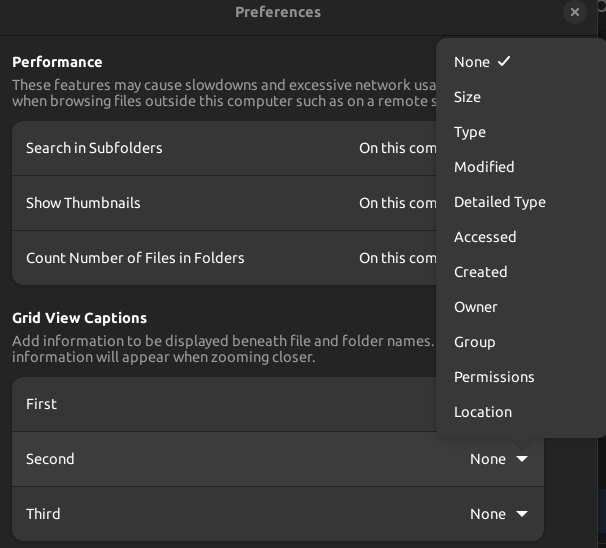
1 Like

Thanks but Size only lists the number of items in the said directory not its actual space size!

No. Most Linux filesystems don’t support storing the folder’s content size as a simple readable value. That means showing the size requires recursing through folders and calculating the size of every file every time when the size is displayed, or do the calculation periodically and cache the result, which might become inaccurate at any time. You might also recursively monitor every folder, but that consumes too much resources and won’t be accurate if you modified the files externally while the system is down or the drive is disconnected.

Bottom line is, either you get a possibly inaccurate size, or you consume too much system resources figuring out the real size.

1 Like

OK, sorry. The only way I know you can effectively do this then is directly in terminal with the tree command such as tree --du -h
See also man tree and

If you want to recursively calculate the size of a single folder, just open the properties.

2 Likes

This topic was automatically closed 45 days after the last reply. New replies are no longer allowed.