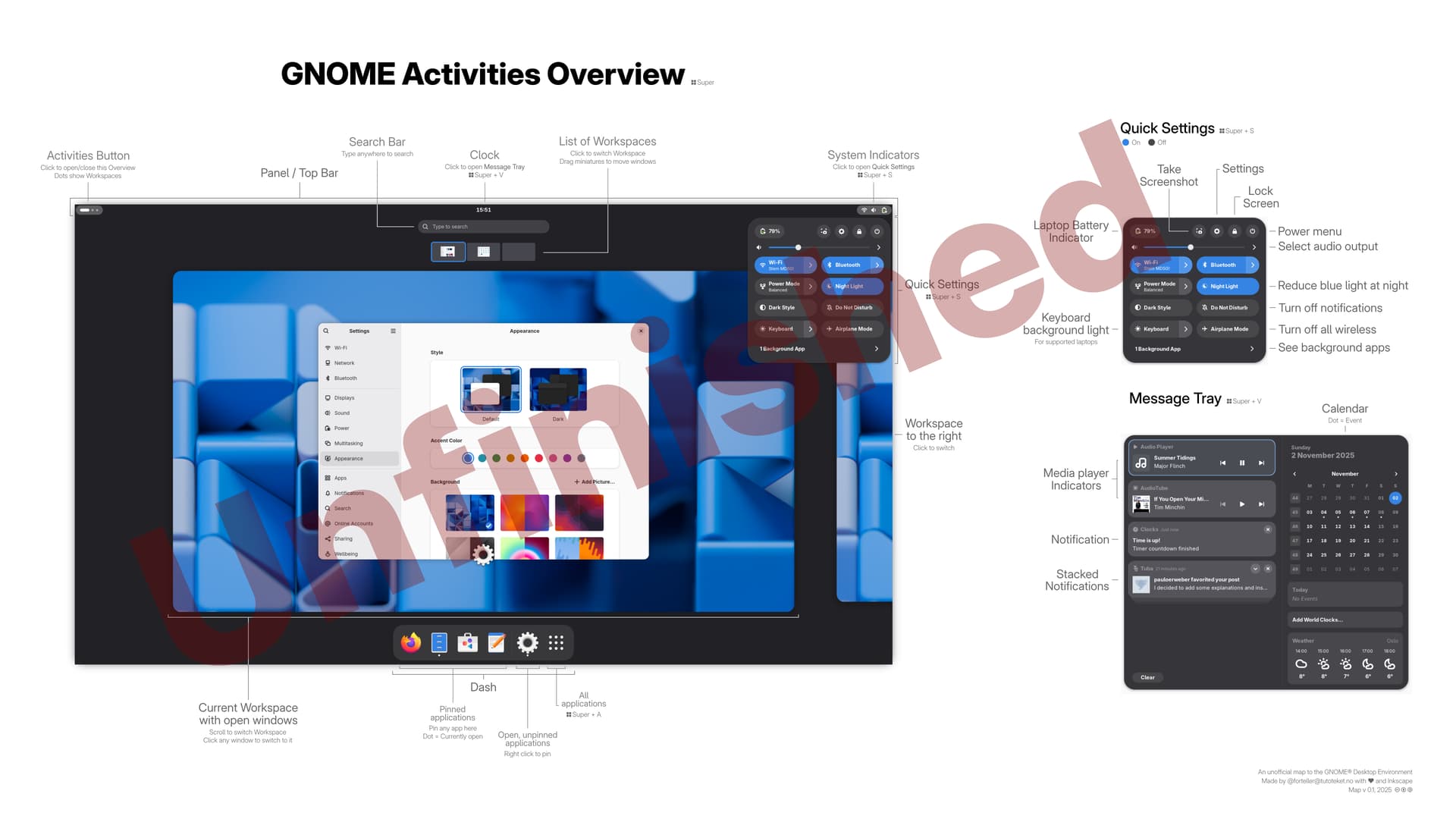
Help wanted: Graphical overview / "map" of Gnome Activities Overview

Hi all.

Some times when I have issues I need to do a search or ask for help – but some times I don’t know the correct words. Maybe I don’t know the official name for a part of Gnome, or I don’t know how to describe it in English.

When this happens, I’ve tried to find a graphical overview with all elements marked and named. But all I’ve ever found has been from the Gnome 3 era.

Thinking that I can’t be the only one who could need this tool, I’ve decided to make it myself.

Now I come to ask for any kind of input before I finish it up and try to spread it around. Have I gotten any words wrong? Are there any typos or anything else that should be improved?

And how would you describe what the “power modes” button does? :sweat_smile:

Thank you very much!

1 Like

Shouldn’t this kind of work be done as part of the official user documentation’s help pages (particularly the visual overview page) and/or the semi-interactive tour app?

1 Like

I appreciate you taking the time to chime in here, Jeff! And yes, I agree – it would be great if there was some official overview of these names and shortcuts from Gnome somewhere! The reason I’m making this is that I haven’t been able to find that anywhere.

I also agree that the help pages would be a good place. But as you can see, they have unfortunately not been kept up to date in a very long time. Maybe if they could be transitioned into a wiki people like me, who want to contribute but can’t code and aren’t designers, could help make them better?

I still have not been able to confirm that I’m using all the correct names for everything, and I don’t want to spread misinformation, so if you know of anyone I could contact to make sure everything is correct, that would be great! I’m also happy to share my raw svg file, if someone in the Gnome team wants to take over, to make sure that it’s up to the high quality standards of Gnome! :slight_smile:

The gnome-user-docs project does not require “programming”, it’s all just XML files (the Mallard syntax). The page I linked to earlier is shell-introduction.page for example. You can fork that project on your own account in GNOME GitLab and send merge requests to improve it, it will be a wortwhile learning experience, and more sustainable than ideas posted in a forum I think.

The web-visible version of that page is outdated compared to what is in the repository and what is visible in GNOME’s built-in Help viewer app, which shows text and screenshot that is much closer to what you’re looking for. Filed a ticket about that in the help.gnome.org project.

Yes please use the Help app on your own system. That has the help pages for your GNOME version. In the app go to Your Desktop > Visual overview of GNOME for a description of the desktop. From there you can go to “Learn more about Quick settings” and it explains the power mode well I think. I didn’t see anything at a glance in the Visual overview of GNOME that looked outdated for my GNOME 49.

It may still be nice to have a global overview, a large image of the desktop with annotations pointing out what’s what, but the Help app should provide the info you need for your GNOME version.