I use Evolution 3.56.2 with Artix and Xfce 4.20.4-1 (Also MX Linux an Tuxedo OS)
Where can I change the font size in the text box? The letters are too small, and ctrl + “+” does not work. This only works, when I read Mails, but not if i write a Mail.
Hi,
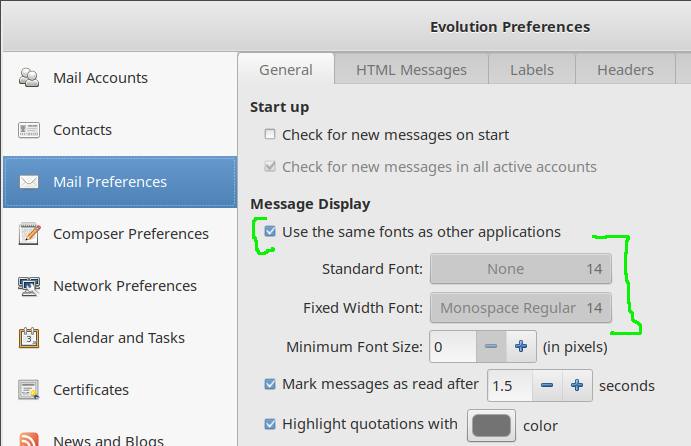
there is used the font size from the system, or from
Edit->Preferences->Mail Preferences->Message Display section->Fixed
Width Font option. It might be inconvenient to read the text in other
apps and in the system the same as it is in the Evolution, I’d guess,
unless you accidentally enabled message display override in the
Evolution - if so, try to disable it first.
The Zoom option for the composer had been added only recently:
this I do not have, or the translation is difficult.
Message Display section->Fixed Width Font option
Or do you mean Editor Settings "plain Text, “html”, “Mark Down” ?
you accidentally enabled message display override in the
Evolution - if so, try to disable it first.
Where can I do this?
If I change the font size of the System, this do not change the font size in Evolution.
Is there no special file in Evolution configuration where I can change the fonts?
I think it is standard. Otherwise that would be very uncomfortable an unusual.
You can’t dictate to users how large the font should be.
Otherwise I feel like Microsoft Windows which patronizing their users
The linked Postings I do not understand. I think they confusing the Edit-Window and zoom the received Mails. I told it above. Zoom is only possible when I read Mails, but not when I write mails.
this I do not have, or the translation is difficult.
Message Display section->Fixed Width Font option
Or do you mean Editor Settings "plain Text, “html”, “Mark Down” ?
Hi,
no, not Composer Settings, but Mail Preferences, the group above the
Composer Preferences/Settings.
you accidentally enabled message display override in the
Evolution - if so, try to disable it first.
Where can I do this?
The same place in the Preferences. From what you wrote, I suppose you
accidentally set Evolution to use a smaller font.
Is there no special file in Evolution configuration where I can
change the fonts?
Why to edit some odd file, when you can do it directly in the GUI? That
you cannot find the setting is pity.
I do not know what translation you run Evolution with. When you start it
from a terminal as: LANG=en_US.utf8 evolution then it’ll start in the
English locale.
Attached is a screenshot which should help you find the option, I hope.
You can’t dictate to users how large the font should be.
I suppose that is some kind of humor or some such thing, because
Evolution does not do that. It has too many configurable options, some
related to the fonts. You can tell Evolution to not follow the system
font too (which happened to you most likely).
Nah, it’s not it and I never meant it that way. It’s easy to overlook
the options, especially when there are many.
I had marked your Post as solved.
Aha, I did not know that. It should be enough by all means. I get these
by mail, thus I do not see how the post look like in the Discourse web
interface. I’m sorry for confusion.