Certificate problem

Hello here !

I use Evolution for two purposes: a personal email address (no problem), and a professional email address (an Exchange account for my work). Everything works perfectly. I’m especially delighted with the “day agenda” module that was recently added (thanks :wink: ). My problem is this.

When I’m connected at home or via my phone’s hotspot, whether I have a VPN enabled or not, everything works perfectly. However, as soon as I connect at work via the Ethernet port (and behind the work proxy), I get a cascade of error messages related to authentication and certificate problems.

The SSL certificate is not trusted. Reason: The certificate signing authority is unknown.

OR

The reported error was "The source does not handle the authentication data request."

I should add that it prompts me to accept new certificates every time. If I accept them, nothing changes, and the next time I start the computer, it prompts me to accept them again…

I’m worried about the network problem at work, but perhaps you might have some ideas to help me get around the problem without having to connect to webmail and continue to enjoy my Linux ecosystem and this wonderful application that is Evolution.

Thank you in advance for your insights.
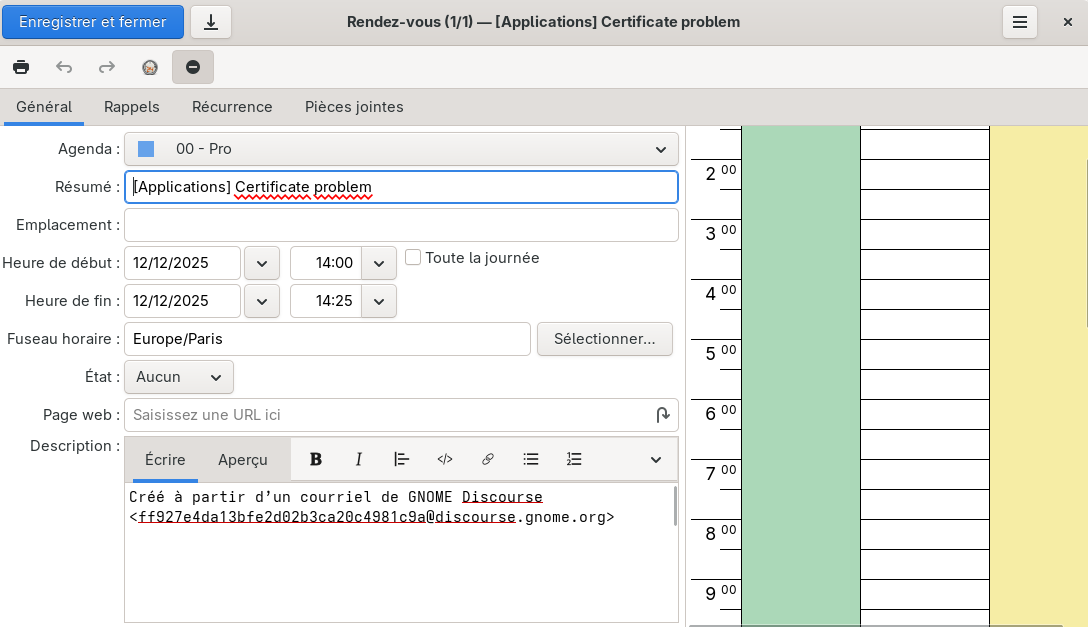
I’m especially delighted with the “day agenda” module that was
recently added

Hi,

you mean in the meeting invitations and/or when adding events/meetings?
That was truly added recently. (You did not mention your Evolution
version though, is it maybe 3.58.x?).

The SSL certificate is not trusted. Reason: The certificate signing
authority is unknown.

It looks like the server (or the proxy?) uses a certificate, which is
created by an authority, for which you do not have installed a root
certificate, or the root certificate is not trusted, though judging
from the error message it’s more about not being installed.

The server can use different routes when connecting to it through the
VPN and within the internal network.

The reported error was “The source does not handle the authentication
data request.”

I do not recall when I saw this one the last time. Do you have
configured your account directly in the Evolution or in the GNOME
Online Accounts? If the later, I’d try to configure it inside the
Evolution. Evolution has more control over it, and gives you more
options, if it’s configured inside itself.

If I accept them, nothing changes, and the next time I start the
computer, it prompts me to accept them again…

With that “nothing changes”, do you mean the account does not connect
and you do not see new mails/events/… from the affected account(s),
or it can connect and works fine only until you restart the computer,
without changing networks?

Those trust prompts you see (accept or not a connection certificate)
save your decision in the account they had been asked for. It saves
only one certificate. When you connect from a different network the
certificate is overwritten, thus also your choice for the connection
through that network. I’m not sure whether it has any impact on your
problem.

You can configure a per-account proxy in Edit->Preferences->Network
Preferences->Switch to Advanced Proxy Preferences button (near the
bottom).

You can also see mail connection certificates in Edit->Preferences->
Certificates->Mail tab. Using the View button you can see whom the
issuer is, the same as you can edit trust for those certificates there.

Hope it helps.

Bye,
Milan

Hi @mcrha

Thank you very much for your reply.

you mean in the meeting invitations and/or when adding events/meetings?
That was truly added recently. (You did not mention your Evolution
version though, is it maybe 3.58.x?).

Yes, I mean the window on the right that recently appeared on my end to show the calendar (on the right) when creating an event. I’d just like to be able to select the calendars that are displayed in that view, but it’s already great.

I do not recall when I saw this one the last time. Do you have
configured your account directly in the Evolution or in the GNOME
Online Accounts? If the later, I’d try to configure it inside the
Evolution. Evolution has more control over it, and gives you more
options, if it’s configured inside itself.

Yes, I created this via Gnome Online Accounts. I need to try configuring it directly in Evolution.

With that “nothing changes”, do you mean the account does not connect
and you do not see new mails/events/… from the affected account(s),
or it can connect and works fine only until you restart the computer,
without changing networks?

I mean, the error messages involving certificates keep reappearing, and I can’t access new emails for this account. It works for my other email accounts, and I can see new messages… so the internet connection is fine.

You can also see mail connection certificates in Edit->Preferences->
Certificates->Mail tab. Using the View button you can see whom the
issuer is, the same as you can edit trust for those certificates there.

I think that’s a good lead. I have nothing for this account in the “mail tab”… the problem might be because I created the account with Gnome Online Account :thinking:

I’d just like to be able to select the calendars that are displayed
in that view

It shows the calendars you’ve selected in the Calendar view, aka those
with the checked box in the tree on the left of the Calendar view. What
you see here should match what you see in the Calendar view for that
day, plus the highlighted time slot for the just to be created event.

I understand a problem might make shared calendars, or free/busy
calendars, which are not “your events”, but which are important when
you want to check whether the person is working or some such thing.

I think that’s a good lead. I have nothing for this account in the
“mail tab”… the problem might be because I created the account with
Gnome Online Account

Hmm, it’s a Microsoft Exchange account, right? Those use libsoup3 under
the hood, which does not store the certificates there. I’m sorry for
misleading you.

Yes, I’ve noticed that. But it’s true that it’s misleading. I often have 5 or 6 calendars displayed in the weekly view, but I don’t need that many to plan an event when I create it. But I may be a special case… with my 18 saved calendars (mainly those of colleagues or rooms).

Okay, no problem.

I just deleted my exchange account in Gnome Online Account to recreate it directly in Evolution and it seems to be working again. Good day.