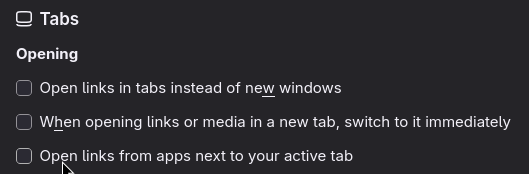
After upgrading to version 51
Enter the nautilus command
He will open a new tab in the existing interface
Instead of opening a new window as before
Hi,
from the CLI --help output:
-w, --new-window Always open a new window for browsing specified URIs
Possibly I need to make a new thread if this is a separate issue but as far as I can tell, this only resolves the issue for CLI uses of nautilus. When I click a file from my browser downloads for example, nautilus opens the containing directory in a new tab if an existing nautilus window is open. The old behavior of creating a new window is preferable to me. Is there a way to globally set the default behavior of nautilus to “new window” vice “new tab”? I have checked both the nautilus preference menu and the dconf settings and haven’t seen a place to set this.
It seems like a bit of a big step to change the default file browser behavior without giving the user the option to revert it but I also may have missed it somewhere. Thanks!
No, there is no official option to revert this behavior. You could try putting a -w parameter in the exec line of nautilus’ desktop file.
Thanks for the reply. My exec line already a --new-window, adding the -w and then rebooting for good measure didn’t change the behavior.
Maybe it’s just me as I’m not seeing any other posts about this but this is a really frustrating change. It would be one thing if I could change it back but having zero option to revert the behavior by way of in app settings, dconf settings, or .desktop exec flags is crazy to me. I’m not saying that Linux should strive to emulate Windows and OSX, but new window vice new tab has been the default behavior on those systems and in at least the file browsers used by Ubuntu going back as far as I can remember (~15 years of on and off Ubuntu and other distros). I’m fine with letting people customize their way out of the default or even changing the default, but why remove the option to keep original behavior?
Sometimes when you get used to this habit, you forget why you got used to it
I still hope to provide a previous option as you suggested
Yes, this new feature is a hindrance. It would be great if the developers added an option to the settings that allowed users to choose whether new items should open in a new tab or a new window.
I read the original thread and I think I understand the problem with Firefox, but this new behaviour is a really really big drag with multiple workspaces, which is a primary feature of GNOME for me.
The problem is making shared tabs the default also infects other ways to open folders. I have the ‘Places’ and ‘Removable Drive’ extensions and I often use xdg-open . in the terminal as the inverse of Nautilus’s Ctrl-. shortcut, so that I can flip between seeing my files in a shell and in the GUI. All of these now funnel into a single window and break my workspace organization and honestly it’s pretty confusing to my head when I’m trying to focus on something.
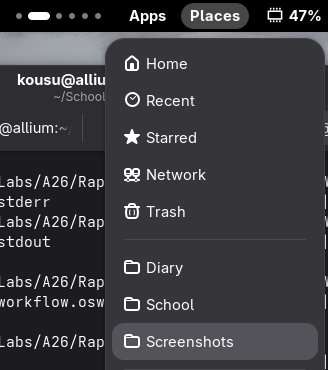
For example, in workspace 2 I have my school work open and in 4 I have music open (very important for getting the school work done  )
If I realize I need to go grab a screenshot for my report, or to share with a collaborator, I’ll usually click here on workspace 2:
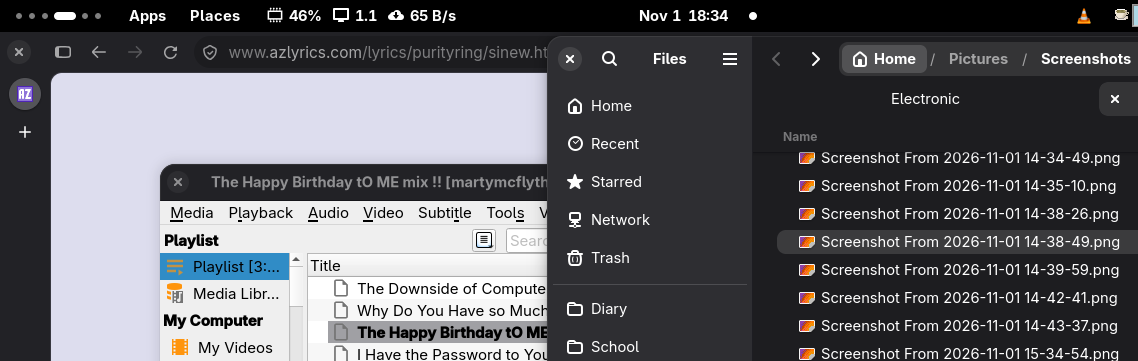
but then I get shoved over to workspace 4 if the last Nautilus I happened to interact with was because I was picking music to play.
And if xdg-open . from workspace 2 to get somewhere to paste the screenshot into… well then instead of taking me to the folder, I just get a notification that something opened, but I don’t see it. I have to go digging around until I find which workspace has the Nautilus window that it opened on 
The behaviour feels random. It’s not, the rule is “open the tab in the last nautilus”. but because the last nautilus is pretty much randomized if you have a bunch of them spread over a bunch of workspaces for a bunch of different tasks, that makes this feature chaotic and distracting.
The point of workspaces is to keep topics and my focus separated! I am finding my entire workflow derailed every time I have to go looking for where my folder opened and drag it back to my original space.
I wonder if it would have been possible to make this feature workspace-sensitive. I don’t want an explosion of windows either necessarily but this situation is a downgrade. That might be tricky to get right under non-GNOME environments (I think particularly it would break in confusing ways under sway) but maybe it could work at least if running under GNOME.
I would like to finish by saying that I appreciate GNOME a lot and it’s my daily driver. I know it’s mostly a volunteer project and everyone’s doing our best. I’m here complaining but this is just one thing, the number of hours of my life I’ve quietly interacted with my DE in happiness more than make up for this gripe.
This new behavior is too annoying on three monitors workstation. Since there’s seemeingly no actions from GNOME team’s side, I took the initiative in my hands and created a small patch for Nautilus, this patch restores the old behavior if /org/gnome/nautilus/preferences/legacy-open-behavior is set to true. If anyone from GNOME team want to integrate my patch you’re free to do so without giving me any credits, this is not a big of a deal, the patch is tiny anyways. Here’s my patch:
diff --git a/data/org.gnome.nautilus.gschema.xml b/data/org.gnome.nautilus.gschema.xml
index 9ce8506bf..3fa89554a 100644
--- a/data/org.gnome.nautilus.gschema.xml
+++ b/data/org.gnome.nautilus.gschema.xml
@@ -178,6 +178,11 @@
       <summary>How to display file timestamps in the views</summary>
       <description>If set to 'simple', Files will show Today and Yesterday with time, otherwise the exact date without time. If set to 'detailed', it will always show the exact date and time.</description>
     </key>
+    <key name="legacy-open-behavior" type="b">
+      <default>false</default>
+      <summary>Use the Files 50 window opening behavior</summary>
+      <description>If set to true, Files will follow v50 behavior and open a new window instead of a tab.</description>
+    </key>
   </schema>

   <schema path="/org/gnome/nautilus/compression/" id="org.gnome.nautilus.compression" gettext-domain="nautilus">
diff --git a/src/nautilus-application.c b/src/nautilus-application.c
index d1ca10b68..6ea7cc596 100644
--- a/src/nautilus-application.c
+++ b/src/nautilus-application.c
@@ -348,17 +348,27 @@ nautilus_application_open_location_full (NautilusApplication *self,

     if (target_window == NULL && (flags & NAUTILUS_OPEN_FLAG_NEW_WINDOW) == 0)
     {
-        /* Reuse active window */
-        target_window = active_window;
-
-        if (target_window == NULL)
+        if (g_settings_get_boolean (nautilus_preferences, "legacy-open-behavior"))
         {
-            target_window = self->last_active_window;
+            if ((flags & NAUTILUS_OPEN_FLAG_REUSE_EXISTING) == 0)
+            {
+                target_window = active_window;
+            }
         }
-
-        if (target_window == NULL && self->windows != NULL)
+        else
         {
-            target_window = self->windows->data;
+            /* Reuse active window */
+            target_window = active_window;
+
+            if (target_window == NULL)
+            {
+                target_window = self->last_active_window;
+            }
+
+            if (target_window == NULL && self->windows != NULL)
+            {
+                target_window = self->windows->data;
+            }
         }
     }
For those who’s unfamiliar with patching here’s steps to apply it:
/home/work/nautilus-open.patchgit apply /home/work/nautilus-open.patchmeson setup build && cd build && meson compilegsettings set org.gnome.nautilus.preferences legacy-open-behavior true or through dconf writeJust came here to say I have exactly the same issue: opening as tab in last used instance is a real regression when using multiple workspaces. The suggestion of opening in as tab in last used instance in the current workspace or spawn a fresh window if none exists in the current workspace would be the ideal fix as far as I’m concerned.
As far as I can tell, the entire change was prompted by this gitlab work item from 2020 where someone wanted things to go to a new tab vice new window. I guess we should just write our own work item and then in 6 years they will revert the behavior back?
I have created work item 4370 on the gitlab page to that end.
I am advocating for adding an option to choose the behavior but based on the discussion thread from the 2020 work item, I’m expecting a bunch of push back. Anyone who suggested adding an option in that thread just got a link to a style guide sort of document about the dangers of excessive preferences choices. I get not adding a choice for every little UI tweak, but some things probably warrant them. If this behavior doesn’t warrant a choice, why did it warrant changing in the first place?
This is great work @igor725 , just really great how you pulled that rabbit out of your hat. Thank you so much for the details patching instructions too.
I don’t think I am going to be rebuilding Nautilus every time I update my system, but making an AUR package with your patch in it so the build happens automatically is within my skills. I’ll let you all know if I do that and maybe it will inspire similar Debian/Fedora/etc efforts.
I tested @igor725 patch and I can confirm that it works. However for Fedora 45 after patching, installing prereqs:
sudo dnf install git meson ninja-build gcc
sudo dnf builddep nautilus
and exec either:
meson setup builddir
ninja -C builddir
sudo ninja -C builddir install
or
meson setup builddir -Dextensions=true
cd builddir
meson compile
sudo meson install
The “open in terminal” and other plugins won’t work because it installs to /usr/local.
sudo ln -s /usr/lib64/nautilus/extensions-4/libterminal-nautilus.so /usr/local/lib64/nautilus/extensions-4/libterminal-nautilus.so
sudo ln -s /usr/lib64/nautilus/extensions-4/libpapers-document-properties.so /usr/local/lib64/nautilus/extensions-4/libpapers-document-properties.sonautilus -q
a softlinks to plugins should help
I forked a repo to gitlab with patch. It is signed with my GPG key. The branch name is 51.1-igor725